



Reverse Check Positive Pay
Reverse Check Positive Pay functions detailed throughout this user guide are available within the Positive Pay menu under the PAYMENTS dropdown menu.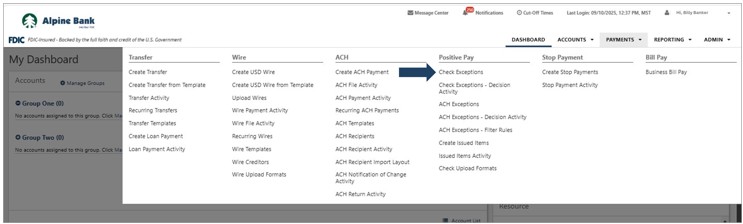
Cut off times are available within the Cut-Off Times menu.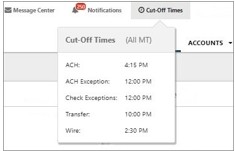
Reverse Check Positive Pay
Check exception items must be reviewed each business day between 6:00 AM and 12:00 PM Mountain Time. If the items are not reviewed by 12:00 PM, they will be returned.
- To review exception items, select Check Exceptions from the Positive Pay menu under the Payments dropdown.
- All checks posting to your account will be presented as exception items under To Decision.
- After reviewing the Details of the exception item, or viewing an image of the presented check, choose Pay or Return for each item, then click Review.
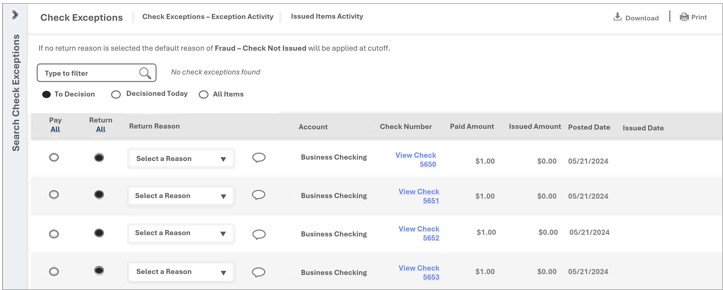
NOTE: If you are returning an item, you may select a Return Reason from the dropdown menu. -
Review your decision for each item and select Confirm Decisions to save.
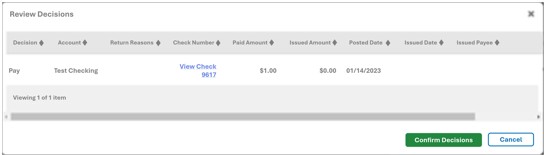
NOTE: You can re-decision a check exception as many times as needed BEFORE 12:00 PM, and you will see the decision history under Details. At 12:00 PM the exception will move to the Check Exceptions – Decision Activity List.
- To review items that have already been decisioned for the day, select Decisioned Today.
- To review all items that were presented for the day, select All Items. Those with a green check mark have been decisioned already but may be re-decisioned until 12:00 PM.
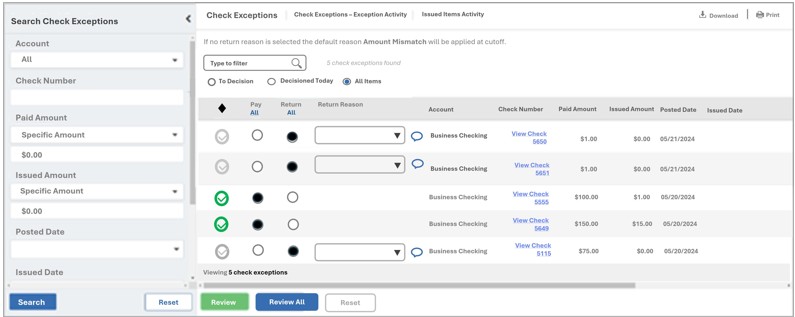
Select Check Exceptions - Decision Activity from the Positive Pay menu under the PAYMENTS dropdown to view all of your check exception decision activity.